This is step 3 in a 4-step tutorial on using GreekTrack for event management.
In order to ensure your chapter's members get the appropriate credit for attending events you and your event coordinators must complete your events. This is a process of reviewing the sign-up list and confirming that everyone who signed-up actually attended the event.
To complete an event:
- Log in as a member who has privileges to complete events. This could be a chapter officer in charge of a requirement credit associated with the event or one of the listed event coordinators for the event.
- Go to the event details page. You may locate the event from the event calendar (choose Events from the menu bar), or if you are an officer you can view all of your events that you manage from the Manage page, then select your event type from the 'Create or update an event' box.
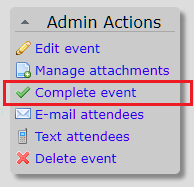
- Once you are on the event details page, from the Admin Actions drop down menu, select Complete Event.
- On the next page you will see a brief summary of the event and then a long list of members who have signed up for this event. In the Credit to Award column the appropriate values will be already pre-filled in. All you need to do is verify that each member actually attended the event.
If they did not attend you may replace the value with '0' to remove them from the event. Or if your chapter's by-laws penalizes members for taking a spot and not showing up, you may also enter a negative number like '-2' which will add two additional hours to this member's requirement as a penalty for missing the event.
If someone attended the event without signing up, and your chapter allows this, you may also add members to the list by choosing the '+ add another member' button and typing in their name then choosing them from the drop down auto-complete menu. - Once you have finished verifying the list you may choose Complete Event. This will close the event blocking anyone else from joining the event as well as credit each attendee with their appropriate requirement credits. In addition each attendee will receive an in-app notification letting them know that the event they attended has been completed and their credit as been added to their accounts. Any members who have opted in to email notifications will also receive an email with the same information. This way everyone knows exactly when it was recorded and their current progress to completing their chapter requirements!
| << Step 2: Signing up for an event | Step 4: Reviewing requirement progress >> |